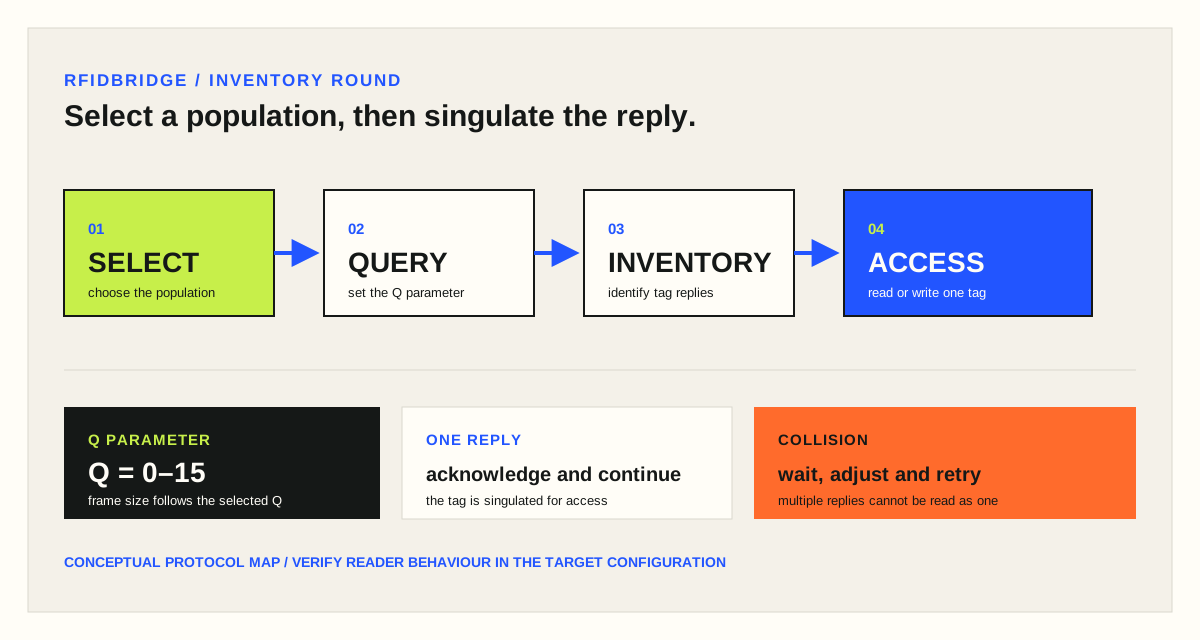
Select, inventory and access operations help a Gen2 reader manage tag populations; the Q parameter helps handle reply collisions.
01 / FIELD NOTE
Keep the decision tied to the operating context.
There are several tools Gen2 readers use to manage the tag population. The reader commands such as Select, Inventory and Access as well as Q Parameter are used for tag singulation. Interrogators manage tag populations using the three basic operations shown. Each of these operations comprises one or more commands. The operations are defined as follows:
• Select : The process by which an interrogator selects a tag population for inventory and access. Interrogators may use one or more Select commands to select a particular tag population prior to inventory.
• Inventory : The process by which an Interrogator identifies tags. An interrogator begins an inventory round by transmitting a Query command in one of four sessions. One or more Tags may reply. The interrogator detects a single tag reply and requests the protocol control (PC), electronic product code (EPC), and cyclical redundancy check (CRC)-16 from the tag. An inventory round operates in only one session at a time.
• Access : The process by which an interrogator transacts with (that is, reads from or writes to) individual tags. An individual tag must be uniquely identified prior to access. There are several tools Gen2 readers use to manage the tag population. The reader commands such as Select, Inventory and Access as well as Q Parameter are used for tag singulation. A reader can select tags in the field before inventorying them by issuing a new command, called Select. It can look for matching bits in the tag identifications, electronic product codes (EPCs), or in the user memory. So, if pallets stacked with tagged cases are coming through a dock door, the reader could issue a Select command to tags with an EPC that indicates they are pallet tags. That way, only the pallet tags respond or the reader could select only case tags. The reader can use several Select commands for more complex operations. The graphic below displays the steps by which an interrogator inventories and accesses a single tag. EPC Gen2 protocol adopted slotted aloha-based probabilistic algorithm to solve the collision problem. As mentioned above, the reader first issues a Select command to pick particular portion of the tag population. Next, the reader issues a Query command, which contains a Q-parameter (value ranging from 0 – 15) to specify the frame size (equal to 2Q-1), then each selected tag will pick a random number between 0 and 2Q-1 and put it into its slot counter.
If the reader often gets back no response to its queries, it automatically decreases the Q value. If it gets more than one tag responding, it increases the Q value, thereby increasing the range of numbers that can be generated by the tags. The reader might issue a query with a parameter of Q=4. The tags generate two random numbers, the first one ranging from zero and 65,535, and the second ranging from zero and 2 to the power of Q, minus 1. If Q is 4, then 2 to the fourth power is 16, minus 1 equals 15. So all tags choose a second random number ranging from zero and 15. The reader asks any tag that chooses zero for their second random number to respond. If one tag has zero, then it responds with the first random number, between zero and 65,535, and the reader acknowledges it. Since the tag has been singulated, the reader could simply count the tag as present. “I know a tag with a random number of 45,101 is in the field.” It could write an electronic product code (EPC) to the tag, if it doesn’t have one, or it could ask tag 45,101 for its EPC if it does have one.
Then, the reader asks the remaining tags to subtract one from their second random number and singulates the next tag that has a zero. It keeps doing that until all the tags are singulated. If no tags choose zero for their first random number, then the reader asks all the tags to decrement their random number by one. It keeps doing that until a tag with zero responds.
If two tags respond, the reader can’t read either tag. So, it issues a negative acknowledge which tells the tags to wait for another query until they respond again.
02 / COMMAND PATH
Move from a selected population to one identifiable tag.
- Select a tag population
- Inventory the replies
- Access the singulated tag
03 / Q CONTROL
Use the Q parameter as part of the collision-handling conversation.
- The described range is Q = 0–15
- No response can prompt a lower Q
- Multiple replies can prompt a higher Q
Bring the item, material, movement, target read and system context to a sample or project review.
Request a sample test